
Practical n8n Automations for Next.js and Serverless Architecture

September 25, 2026
When building modern web applications in serverless environments (such as Next.js deployed on Vercel), processing background tasks directly inside your backend can become unnecessarily complex. You don't have a traditional persistent server to run background jobs or local mail agents, and relying solely on direct API calls inside your API Routes or Server Actions can tightly couple your code and slow down user response times.
In this architecture, n8n acts as a lightweight, decoupled, and highly reliable secondary backend.
Below are 3 practical real-world use cases showing how n8n streamlines backend operations for web projects.
Case 1: Handling Form Submissions via Email in Serverless Environments
Processing and sending contact form emails directly from a serverless application often introduces unnecessary latency or points of failure.
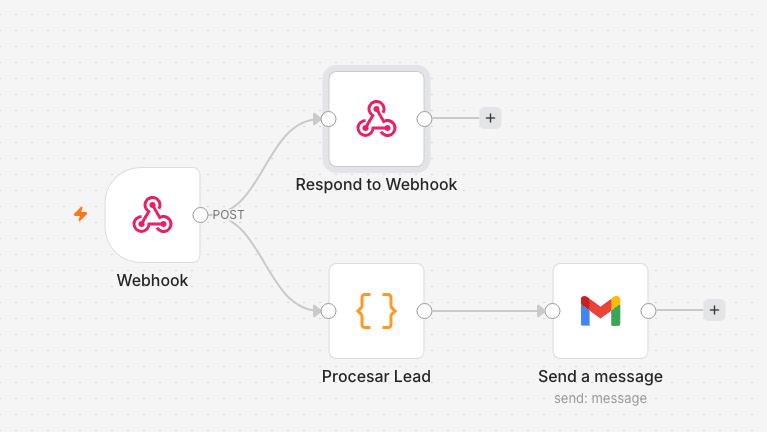
Workflow Breakdown:
- Webhook: Receives the incoming data payload sent from the web form in Next.js.
- Respond to Webhook: Instantly returns a
200 OKresponse to the client app. This allows the frontend to show an immediate confirmation message ("We received your message!") without making the user wait for the email processing overhead. - Process Lead (Code Node / JavaScript): Normalizes and sanitizes the received fields, formatting them into structured HTML for the email body.
- Send a Message (Gmail Node): Takes the formatted payload and sends the notification email to the designated recipients.
Why use n8n instead of a direct inline script?
- Decoupling: Swapping email providers (e.g., from Gmail to SendGrid or Resend) only requires updating a node in n8n—no code changes or re-deployments needed on your main website.
- Error Resilience: If the mail provider API experiences downtime, n8n automatically handles retries without losing lead data.
Case 2: 14-Day Free Trial Registrations in Google Sheets with Fallback Error Handling
When offering a trial registration or promo request from a Next.js app, it is critical to ensure data is safely logged while providing clear error handling if third-party infrastructure fails.
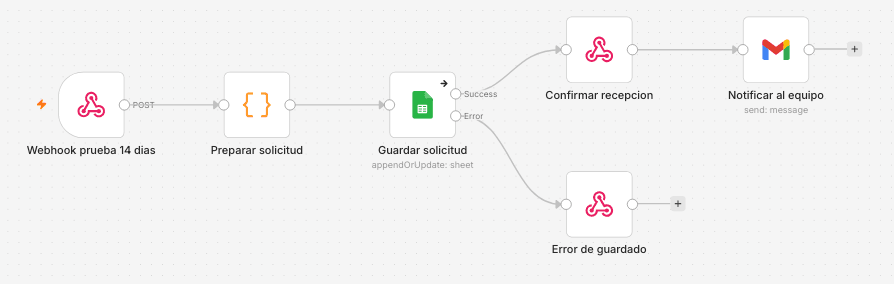
Workflow Breakdown:
- Webhook 14-Day Trial (
POST): Listens for incoming form requests sent from the Next.js frontend with user details (name, email, company, etc.). - Prepare Request (Code Node): Standardizes variables (such as calculating the trial expiration date by adding 14 days to the timestamp).
- Save Request (Google Sheets Node): Executes an
appendOrUpdateoperation in Google Sheets to store the lead.
- "Success" Branch: Continues to confirmation if the row is saved successfully.
- "Error" Branch: Triggers a fallback route if Google Sheets API fails or encounters rate limits.
- Confirm Reception / Save Error (Respond to Webhook Nodes):
- On success, returns a
200 OKstatus so the UI displays a success confirmation. - On failure, returns a controlled
400or500status code, enabling the frontend to gracefully prompt the user or trigger a client-side retry without crashing the interface.
- Notify Team (Gmail Node): Sends an internal alert email to the sales or support team once reception is confirmed.
Key Architectural Benefits:
- Explicit Exception Handling: Branching into Success and Error paths prevents silent failures and handles Google API issues gracefully.
- Clean Frontend Code: Keeps third-party Google SDKs and secret keys completely out of your Next.js repository.
Case 3: Automated Cron Job for Subscription Expiration Management
For regional platforms or directories (like regional hotel portals operating across multiple states), tracking subscription lifecycles automatically is essential to retain revenue and keep clients informed before their service expires.
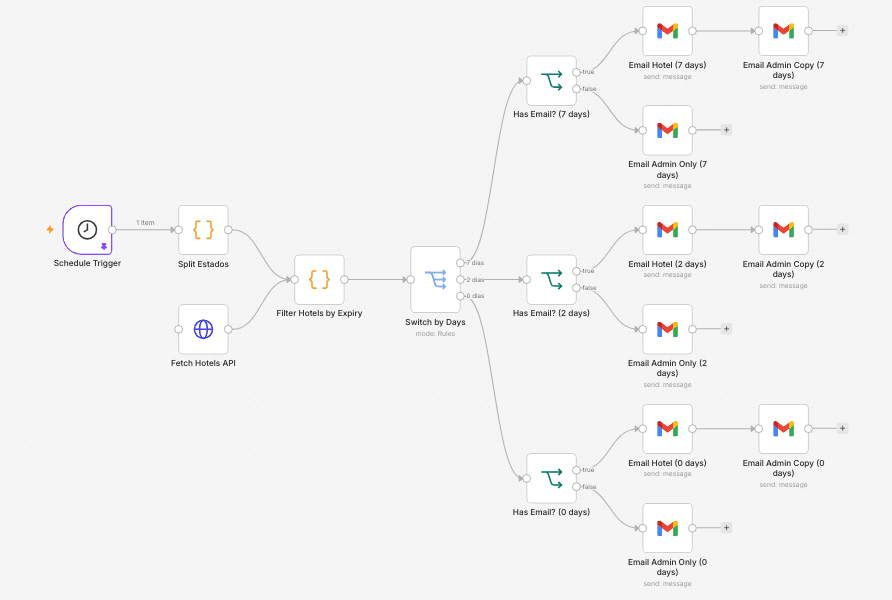
Workflow Breakdown:
- Schedule Trigger: Operates as a scheduled Cron service running automatically every day at 10:00 AM.
- Split States & Fetch Hotels API:
- Split States: Breaks down coverage regions/states to iterate through queries cleanly.
- Fetch Hotels API: Queries the database endpoint via HTTP Request to fetch active hotels and subscription expiration metadata.
- Filter Hotels by Expiry (Code Node): Filters records in memory using JavaScript by comparing expiration timestamps against the current date.
- Switch by Days: Routes execution into 3 urgency levels:
- 7 Days Notice: Preventive renewal reminder.
- 2 Days Notice: Urgent upcoming expiration notice.
- 0 Days (Expiration Day): Final account expiration notice.
- Contact Validation & Email Alerts (Has Email? & Gmail Nodes):
- If Email Exists (
true): Sends payment instructions directly to the hotel (Email Hotel) and routes a copy to internal admins (Email Admin Copy). - If Email Missing (
false): Routes a high-priority alert to the team (Email Admin Only) so a representative can follow up via phone or WhatsApp.
Key Architectural Benefits:
- Zero Manual Effort: Eliminates the need for manual daily database audits.
- Tolerance to Incomplete Data: Prevents workflow crashes when contact emails are missing by routing executions to manual fallback branches.
- Serverless Cost Savings: No persistent background workers running in memory 24/7; n8n only spins up during scheduled execution windows.
Conclusion
Integrating n8n as an orchestration layer alongside modern tech stacks (Next.js, Supabase, Vercel) transforms web development:
- Decoupling & Simplicity: Keeps your frontend applications focused on UI performance rather than heavy background operations.
- Infrastructure Resilience: Explicit success/error paths ensure fast user feedback while delegating retries to n8n.
- Operational Scalability: Easily build and iterate on complex business logic—from simple forms to automated billing alerts—in minutes without needing to push new code to production.
If you want to streamline business operations, integrate existing tools, or build resilient serverless applications, n8n is one of the most powerful and cost-effective tools in the modern ecosystem.